
Copyright © 2025 Nyxell. All rights reserved.
Table Of Contents
1. Introduction
2. Getting Started
3. Game Cards
4. How To Play
5. Extras
Introduction
The Commanders Guide is issued exclusively to officers holding the rank of Commander within the R.A.I.S.E Armed Forces. As one of the top three ranks in Strategic Command, you are entrusted with directing entire conflict zones and executing the campaigns set forth by your General.
Contained within are the complete operational doctrines, advanced battlefield mechanics, and protocols necessary to coordinate Majors, Captains, and all subordinate assets under your authority. This guide is designed to refine your ability to manage resources, control tempo, and maintain operational superiority in every theater of war.
We fight not because we believe we can destroy the Machines, but because surrender is not an option. For as long as one human stands, R.A.I.S.E will stand.
WE WILL FIND A WAY
Of Men and Machines is a turn-based strategy card game focused on resource management and territorial control. Two or more players alternate between attacking and defending across a series of rounds to build defenses, launch attacks, and gain control over the playfield by any means necessary.
Of Men and Machines is currently in closed beta with games hosted by Nyxell on Tabletop Simulator. The documents provided with this copy of The Commanders Guide refers to all information relative to Version 5 (v0500).
Understanding Keywords
Capitalized or Red text refers to a term or game mechanic that is defined elsewhere in the document. Keywords can also be found in the Glossary.
Getting Started
Required Items
Faction Decks  /
/  /
/ 
58 to 60 cards.
The R.A.I.S.E and MACHINES Faction Decks.
Each Faction comes with 2 Unit Decks. These are required at minimum for standard play:
- 1 Soldier Deck (30 cards)
- Standard Soldier Decks contain 30 cards.
- 1 Specialist Deck (28 to 30 cards)
- Standard Specialist Decks contain 28 cards.
- Factions of the Titan Archetype will have 30 cards instead.
Expansion Factions may have their own Added decks on top of the core Unit decks. Factions with several decks cannot be played unless all decks are present.
Power Deck 
60 cards
A selection of cards used to create the Power Deck.
This deck contains a variety of neutral cards that are used during a match. All players will draw from this deck during standard play.
Captain Cards 
1 Per Player
The R.A.I.S.E and MACHINES Captain Cards.
Captains are required for 2 of the 4 win conditions of standard play. Each Faction comes with their own Captain Card.
Optional Items
Battle Mat
A 1v1 "Arena" layout battle mat.
Battle Mats keep card positions organized during play, as well as providing allocated slots for each card deck in use. Game mats can also come with a variety of layouts of Playfields, themes, and additional effects that change up how the game is played.
You can also play without a battle mat, as long as the Playfield layout is defined beforehand.
Tokens
A variety of provided tracking tokens.
Tokens are used to track numerical values or Statuses applied to the Playfield. As the number of trackable items increase, it may become more difficult to mentally keep record of everything ongoing during play.
Coin
A provided game coin.
Some setup steps or cards may require a coin toss. Coin faces can also be used to indicate who is currently the Lead Player in 2 player games.
Dice
A provided tracking D6 dice.
Status effects with long durations can be tracked using a set of dice. It may be redundant when status effects have short durations or are not in use at all.
Notepad
A notepad tracking a variety of stat durations and captain Health Points.
Notepads can significantly reduce the amount of mental tracking that needs to be performed during standard play. It is especially useful for keeping track of Captain Health Points or individual status effect durations.
Game Setup
It is recommended to perform game setup once all players understand how to read their cards. If you are unsure how to read a card, refer to Game Cards.
0. Determine Factions and Game mode
- If each player brings their own Faction decks, each player plays with the decks they brought.
- If decks are provided by a host or are put into a pool to choose, the host chooses their Faction first.
- All other players will choose their Factions clockwise from the host.
- Choose between playing Alliance Battles or Free For All.
- Alliance Battles: Split players into even teams. Each Team will operate as 1 Alliance. Each Alliance is eliminated individually until 1 Alliance reaches a win condition.
- Free For All: All players will operate as their own individual Factions. Each player is eliminated individually until 1 player reaches a win condition.
1. Lay out the Battle Mat
- If a battle mat is used during the match, lay it onto a flat surface for play.
- Battle mats provide colored seats to indicate where players sit relative to the Playfield.
- If no battle mat is present, refer to a visual guide on where to sit and place cards.
2. Claim Your Territory
- In Alliance Battles, choose 1 of your Alliance's Faction tokens to represent your entire Alliance.
- In Free For All, each player uses their respective Faction's tokens.
- Place your Faction tokens over the colored cells representing your seat color.
- Faction colors and seat colors do not need to match.
3. Shuffle The Cards
- Hand your Faction decks to the player across from you, and receive their Faction decks.
- Shuffle each deck thoroughly, then split each deck in half and stack.
- Ensure that you do not mix decks together, only stack their respective halves together.
- Return each deck back to their owner, and wait until you have received yours.
- Place each deck face-down in their respective zones on the battle mat.
- If no battle mat is present, ensure that all decks are outside of the designated Playfield and place where they are easily accessible.
4. Choose Who Plays First
- Flip a coin to decide who will have the first turn. Play alternates clockwise of the starting player.
- In 3+ player battles, roll a D6 instead with highest roll being the first player.
- In Alliance Battles, clockwise play moves per Alliance, with 1 player per Alliance being the lead player. The player chosen from the Alliance also alternates clockwise.
- The starting player may pick their faction passive first. All other players will do the same in play order. (See Faction Passives)
- Choose a starting layout for the Playfield. (See Starting Layouts)
5. Begin The Game
- Place your Captain card onto your seat color's Star Cell, and play begins with the starting player.
Game Cards
Unit Cards /
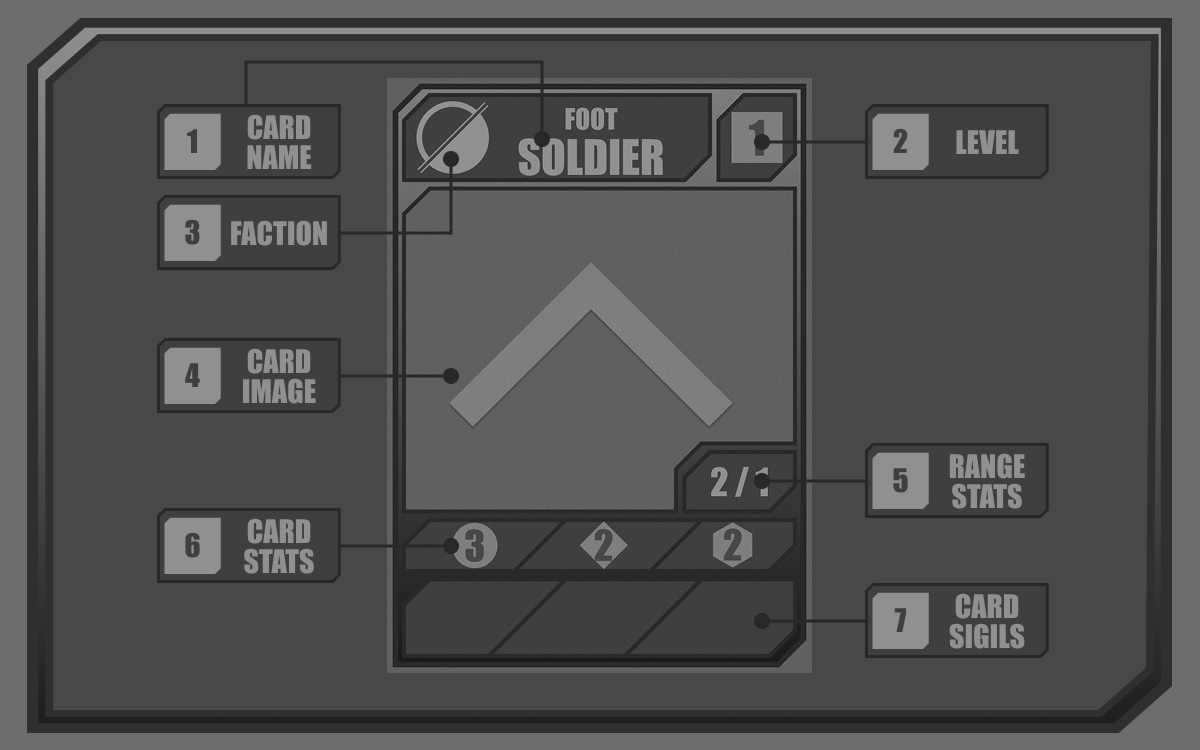
A neutral Soldier Card.
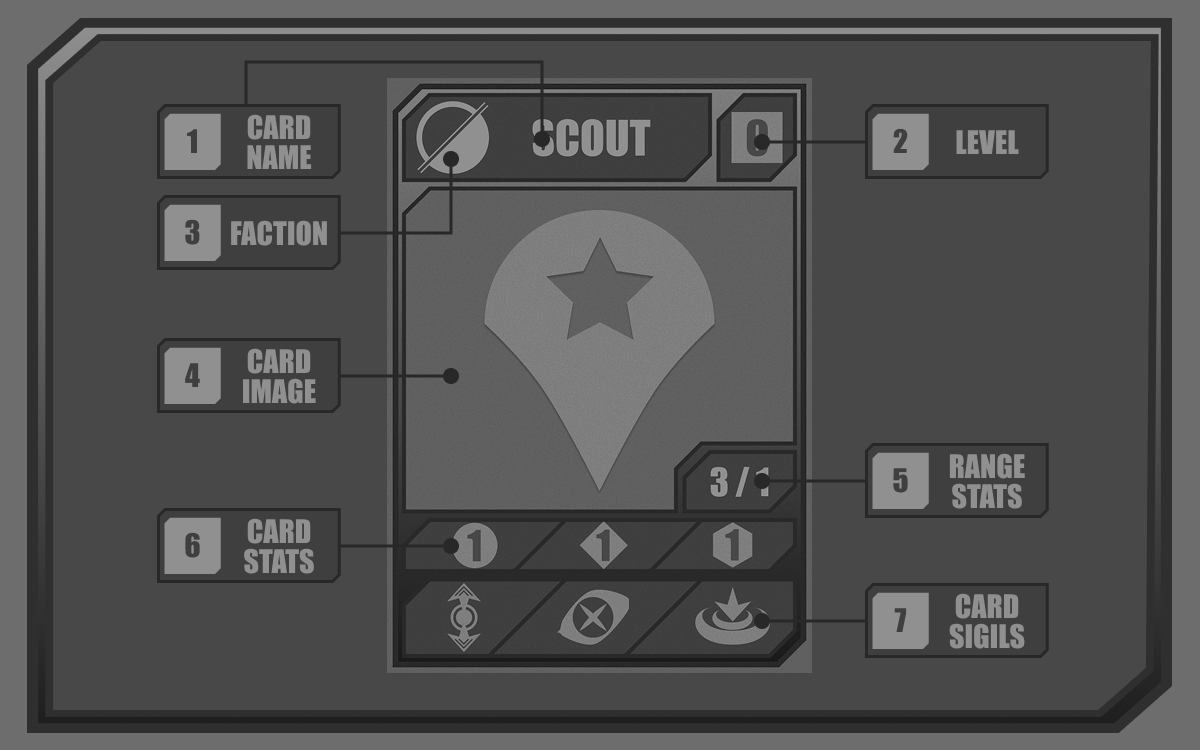
A neutral Specialist Card.
Unit cards are the main fighting force of all Factions. During standard play these cards are deployed to the Playfield and may move, attack, and be Destroyed when active.
Unit cards are broken into two card types:
- Soldier card.
- Specialist card.
Both cards are split into their own respective decks and can be referred to individually as Soldiers and Specialists. Units encompasses both types.
Reading The Card
1. Card Name
This is the card's name. Each card has a unique name based off who they are and what they do. Cards may be referenced specifically by name, though are usually referred by their card type.
2. Level 
The strength tier of a card and its activation cost. All cards by default cost Turn Points to be put into play from a player's hand relative to their Level from 0 to 5. Level 6 cards are exclusive to the Titan Faction Archetype.
3. Faction
The Faction this card has pledged allegiance to. Cards can only be sent to the hand and activated from the hand of their Faction owner, with the exception of Power cards, who have no Faction.
Ownership of a card is not locked to a Faction when in the Playfield, some abilities may change allegiance, but these cards cannot be removed from the playfield other than being destroyed or returned to their initial owner.
4. Card Image
The image of the card. Some cards may display portraits of their Unit, or may display an icon.
5. Range Stats  /
/ 
Unit cards can only move and attack a certain number of cells away from their position at a time. This is referred to as Speed for movement, and Range for attack.
When the range stat is split into two numbers this means Speed and Range have different values. Speed is the left number, while Range is the right.
6. Card Stats  /
/  /
/ 
The face value stats of a Unit card. Each Unit card has a Health, Damage, and Trade value printed onto the card. (See Card Stats)
7. Card Sigils
Unit cards can bear up to 3 Sigils at a time.
Captain Cards
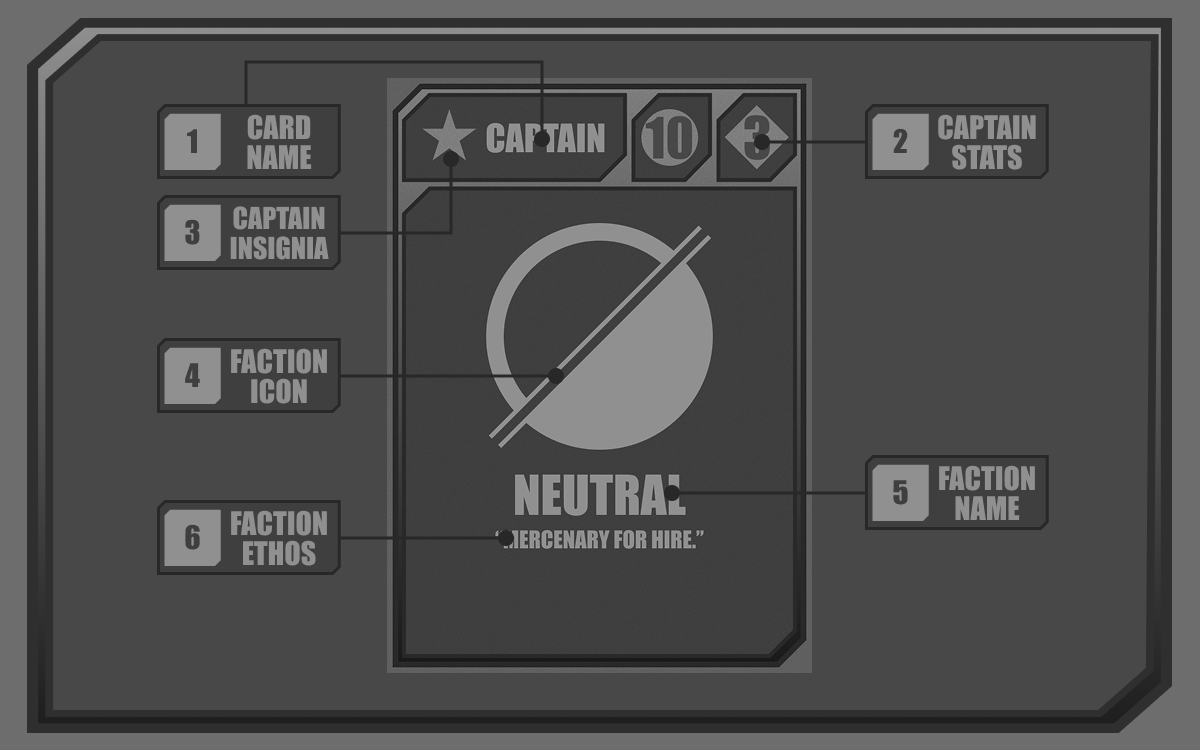
A neutral Captain card.
Captains are the core of a Faction's presence on the Playfield. They are responsible for capturing objectives in standard play, and are a player's most valuable asset. If a Captain is destroyed, their owner is eliminated from play.
Captains behave like Units when on the playfield, able to move and attack once per turn at no cost. Captains have a range stat of 1.
Reading The Card
1. Card Name
This is the card's name. All captains have the title of CAPTAIN.
2. Card Stats /
The face value stats of a Captain card. Each Captain card has a Health and Damage value printed onto the card.
3. Captain Insignia
The star insignia of a captain.
4. Faction Icon
The Faction this card has pledged allegiance to.
5. Faction Name
The name of the Faction this card has pledged allegiance to.
6. Faction Ethos
A short one to two sentence string of flavor text, similarly used in the Faction's profile.
Utility Cards 
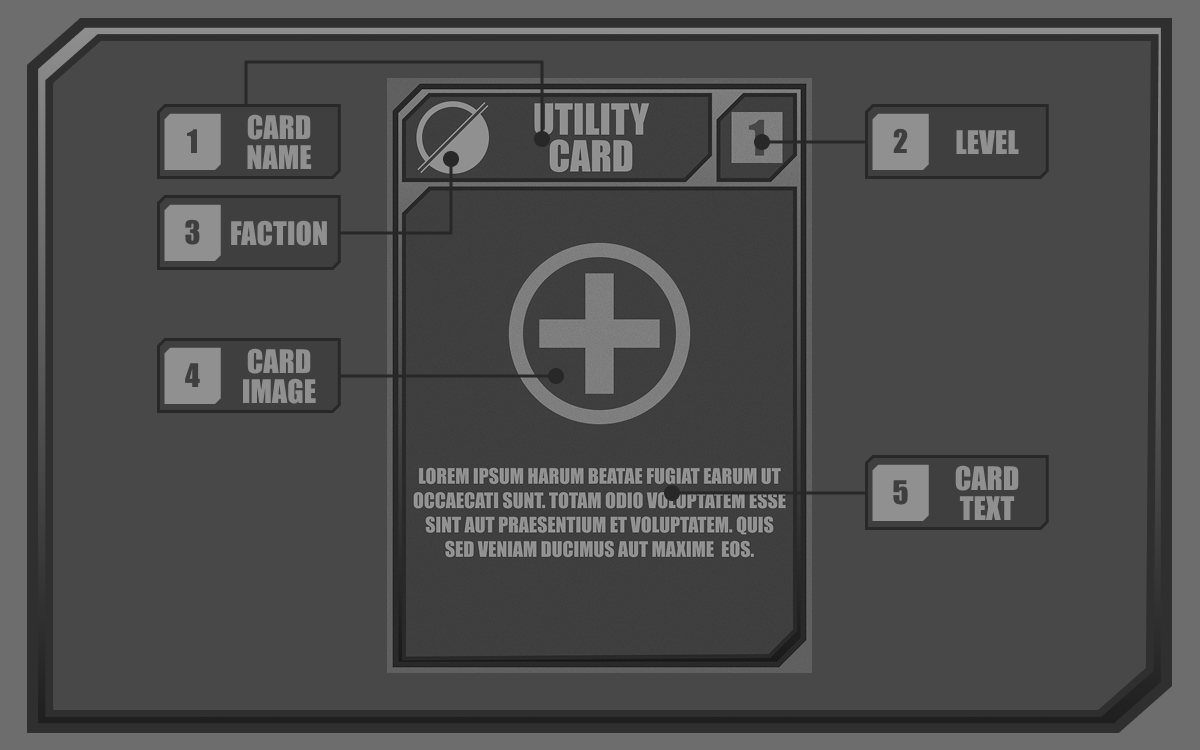
A neutral Utility card.
Utility cards are non-placeable cards that offer instant use or persistent abilities and effects upon being activated. These cards do not go onto the playfield, and are placed either directly into a discard pile or off to the side when used.
Reading The Card
1. Card Name
This is the card's name. Each card has a unique name based off what they do. Cards may be referenced specifically by name, though are usually referred by their card type.
2. Level
The strength tier of a card and its activation cost. All cards by default cost Turn Points to be put into play from a player's hand relative to their Level.
Some cards can only be played when Attacking, or when Defending. The Turn Points used to play this card are based on the current turn stance.
3. Faction
The Faction this card has pledged allegiance to. Utility cards can only be sent to the hand and activated from the hand of their Faction owner, with the exception of neutral cards, who have no Faction.
4. Card Image
The image of the card. Some cards may display portraits of their Utility object, or may display an icon.
5. Card Text
The card's description text that explains the conditions for using a card and the effects that it provides upon activation.
Structure Cards 
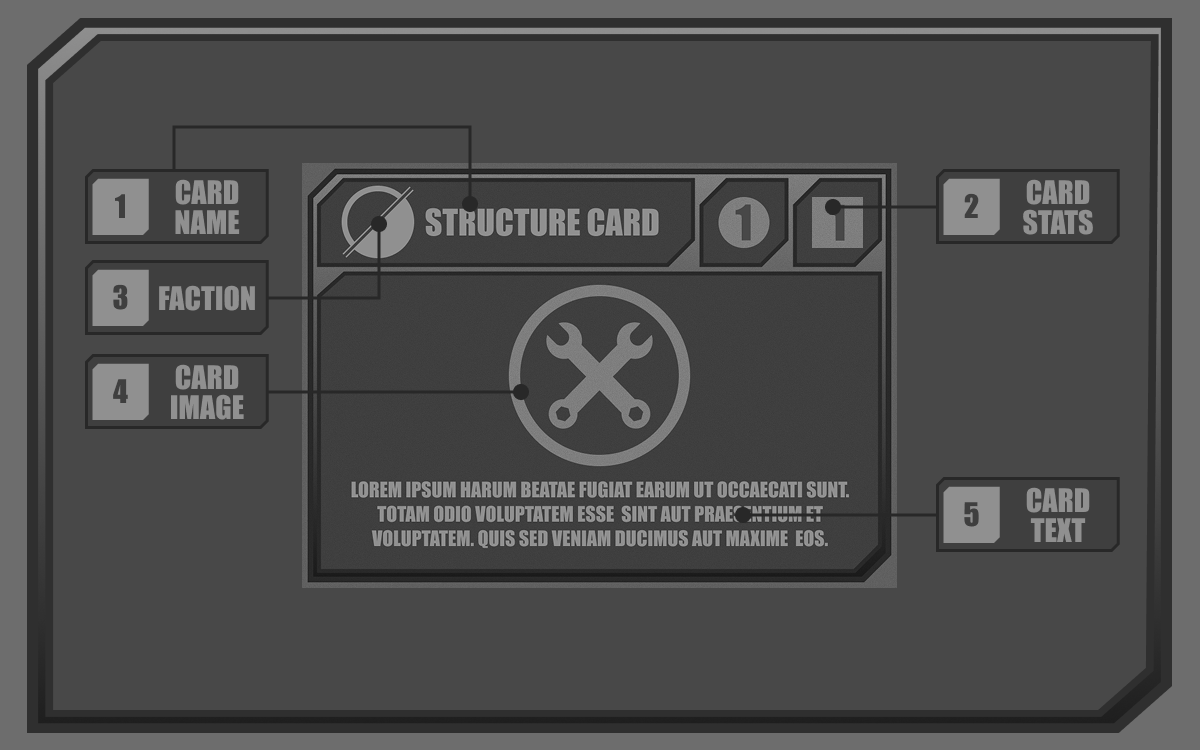
A neutral Structure card.
Structure cards are static cards that are constructed to the Playfield to provide either passive or active abilities based on set conditions regarding the state of the Playfield itself (usually referring to the cells adjacent to the card).
Structure cards, like Units and Captains, can be destroyed by being attacked. Structure cards are additionally the only cards that have their main position in landscape.
Reading The Card
1. Card Name
This is the card's name. Each card has a unique name based off what they do. Cards may be referenced specifically by name, though are usually referred by their card type.
2. Card Stats /
The face value stats of a Structure card. Each Structure card has a Health and Level value printed onto the card.
3. Faction
The Faction this card has pledged allegiance to. Structure cards can only be activated from the hand of their Faction owner, with the exception of neutral cards, who have no Faction.
4. Card Image
The image of the card. Some cards may display portraits of their Structure object, or may display an icon.
5. Card Text
The card's description text that explains the conditions for using a card and the effects that it provides upon activation.
How To Play
Win Conditions
The objective of the game is to be the first player to reach one of any of the available win conditions:
Victory By Control
R.A.I.S.E occupies all objective cells on the Playfield
Victory by Control occurs when one player or Alliance occupies all control points on a playfield.
Units and Captains may contest a control point cell if it is unoccupied. Units will only neutralize a control point (if it was previously owned by a faction), while a captain will capture it. Control points must be occupied for 1 full round before the allegiance changes.
Victory By Elimination
The Machines have dealt enough damage to destroy the R.A.I.S.E Captain.
Victory By Elimination occurs when your opponent's captain is destroyed.
If a Captain is destroyed during a players Defending Turn, that player is granted one final Attacking Turn known as Last Stand.
During Last Stand, the attacking player must complete any win condition to force a Draw. Failure to do so at the end of the turn results in a loss.
Attacking players will lose instantly if their Captain is destroyed while attacking.
Victory By Attrition
The Machines have no more Unit cards available.
Victory by Attrition occurs when your opponent cannot draw any Unit cards during their draw phase.
Discarded cards are only reshuffled back into their respective decks when a Faction deck is empty. Discarded cards are sent to the discard pile, while destroyed cards are removed from the game entirely.
Victory By Domination
The Machines occupy all of R.A.I.S.E's spawn cells, and R.A.I.S.E has no Units on the playfield.
Victory by Domination occurs when your opponent cannot spawn any new Unit cards and has no Units on the Playfield.
Unit cards can only be deployed from eligible spawn cells, or if a card or ability states a card may be deployed with them. Units can only be deployed on unoccupied cells, so if all spawn locations are blocked, a player cannot deploy Unit cards.
Turn Structure
Each round of gameplay is divided into Attacking and Defending turns played simultaneously. When one player is attacking, the other is defending.
In 3+ player battles, any player that is not the lead player is considered defending.
Turn Phases
The turn phases for both an attacking and defending turn.
Attackers and defenders progress through a linear series of phases during their turn. At the end of the turn, play alternates clockwise.
Attacker
Draw Phase
This is the first phase of the attacking turn where you must create your staring hand.
- Draw 2 and choose 1 to Deploy instantly.
- This deployed card ignores Deployment Delay and can be deployed anywhere in your territory.
- If no card is eligible to be deployed, discard 1 instead.
- The remaining card is added to your hand.
- Draw 2 and 3 , then add your Reserve into your hand.
- Resolve any card effects that occur during the Draw Phase, then move to the Build Phase.
Tip: Before adding your Reserve, your hand should consist of 2 Soldiers, 1 Specialist, and 3 Power Cards.
Build Phase
The Build Phase is where you construct your defenses, deploy Units, and prepare for the upcoming battle.
- Resolve all Status effects that will end on your turn.
- Resolve any card effects that occur during the Build Phase.
- Gain ATP until you have 7 ATP available.
- Afterwards, you may perform any of the following actions with ATP:
- You may also perform the following actions without ATP:
- Wait until all defending players are ready to progress, then gain ATP until you have 7 again and move to the next turn phase.
- You may choose to either begin your Move Phase or Battle Phase first, with the latter occurring afterwards.
- You cannot return to a phase once it has passed.
Move Phase
The Move Phase is where the attacker may move their Unit and Captain cards to new positions on the Playfield. Unit and Captain cards may only move once per turn unless stated otherwise.
You may perform any of the following actions with ATP:
- Move a / or
- Activate from your hand.
You may also perform the following actions without ATP:
- Scrap a /
To move a card, perform the following steps:
- Select 1 / or
- Select 1 target cell to move to.
- The selected card must be able to reach the targeted cell based on their
- Cards can only travel 1 cell diagonally unless stated otherwise.
- The selected card must be able to reach the targeted cell based on their
- Pay 1 ATP and move the selected card from their starting cell to the target cell.
- When moving pay 0 ATP instead.
- When moving
- Repeat this process until you have no remaining Turn Points, eligible cards, or voluntarily end the phase.
- If this phase was picked to progress first, move to the Battle Phase, otherwise move to the End Phase.
Battle Phase
The Battle Phase is where the attacker may initiate combat on any destructible card on the Playfield using their Unit or Captain cards. Attacks are either initiated as Single Combat or a Skirmish. Unit and Captain cards may only attack once per turn unless stated otherwise.
The Battle Phase will only cover Single Combat. See Skirmish for Skirmish rules.
You may perform any of the following actions with ATP:
- Attack with a / or
- Skirmish with up to 3 /
- Activate from your hand.
You may also perform the following actions without ATP:
- Scrap a /
To attack with a card, perform the following steps:
- Select 1 / or
- Select 1 target cell to attack.
- When attacking, you attack the entire cell, which damages everything that is currently occupying a cell, not just a single entity.
- The selected card must be able to reach the targeted cell based on their
- Pay 1 ATP and deal Direct Damage to the target cell based on your card's
If a targeted cell contains a card with , this means the card is destructible. The damage dealt must be resolved before moving on.
- Compare the total dealt to the damaged card's remaining , then apply effects based on the result:
- If the total exceeds the damaged card's remaining , destroy the target card and gain +1 ATP.
- If the total dealt does not exceed the damaged card's remaining , deal 1 Direct Damage.
- If the total
- Repeat this process until you have no remaining Turn Points, eligible cards, or voluntarily end the phase.
- If this phase was picked to progress first, move to the Move Phase, otherwise move to the End Phase.
End Phase
The end phase is where attackers announce the end of their turn and prepare to go on the defensive.
- Announce the end of your turn.
- Choose up to 3 cards in your hand to send to your Reserve, and discard the remainder.
- Your reserve cannot exceed 6 cards.
- Resolve any card effects that occur during the End Phase.
- Relinquish the attacking position clockwise, then begin your Defending turn.
Defender
Draw Phase
This is the first phase of the defending turn where you must create your staring hand.
- Draw until you have a hand size of 6 cards.
- Choose 1 card from your hand to activate immediately.
- If the card is a /, Deploy the card and ignore Deployment Delay.
- If the card is a , Construct the card and ignore Deployment Delay.
- If the card is a , its condition must be met in order to Activate.
- If no card is eligible or you choose not to play a card, keep all cards in your hand.
- If the card is a
- If you activated a card, draw until you have 6 cards.
- Resolve any card effects that occur during the Draw Phase, then move to the Build Phase.
Build Phase
The Build Phase is where you can add any last minute fortifications to your position or improve the survival chances of your Units.
- Resolve any card effects that occur during the Build Phase.
- Gain DTP until you have 5 DTP available.
- Afterwards, you may perform any of the following actions with DTP:
- Activate from your hand.
- Construct from your hand to the Playfield.
- Fortify / that are on the playfield.
- Activate
- When finished, announce the end of your build phase.
- Gain DTP until you have 5 DTP available.
- Wait until the attacking player moves into their next phase.
Standby Phase
The standby phase occurs after the Build Phase where defending players will wait until the conditions of their Structures and Utility cards are met, or they are attacked by a player.
When a condition of a Structure or Utility card is met and you wish to act on it, you must announce that an effect has been triggered, or that you are moving into the Act Phase.
When an attacking player initiates combat on your Units or Captain but does not destroy them, you are given the option to Counterattack. If you choose to counterattack, you must announce you are moving into the Counterattack Phase.
Act Phase
When a condition of a Structure or Utility is met, a defender can act on that effect, putting them into a temporary phase that all other players must abide to. Any actions made during the Act Phase take priority over all other actions and effects.
When in the Act Phase, you may perform the following with DTP:
- Activate an ability or effect of a deployed
- Activate an ability or effect of a in your hand.
In 3+ player battles, Acts remain open for a Challenge for any player that has not already participated in the Challenge.
To participate in a Challenge:
- Announce that you are entering the Challenge.
- Activate a or ability as an argument to the Challenge.
- Your argument must correlate to the most recent argument of the Challenge.
- If no argument is presented or possible, All arguments are activated in reverse order starting from the last argument.
Note: You can only enter a Challenge if you have not previously added an argument to the Challenge. The attacking player and defending player starting the Act Phase cannot enter the Challenge.
Example: Player A destroys a card owned by Player B. Player B then enters the Act Phase and plays a card to negate player A's action. In 2 player battles, no Challenge is possible, and the effects are applied as follows: B -> A.
Example 2: In 3+ player battles, Player C may enter the Challenge with a card to negate player B's card effects. Player D may also enter the Challenge with a Structure ability to prevent the use of Utility cards. With no further arguments possible, the Challenge ends, and the effects are applied as follows: D -> C -> B -> A.
When finished, return to the Standby Phase.
Counterattack Phase
A defending player is moved into the Counterattack Phase when an attacking player attacks their cards using a Skirmish, and they choose to initiate a Counterattack.
- Select the / or that was attacked, or an adjacent / or if the card was destroyed.
- If the destroyed card does not have an adjacent ally, you may not initiate a Counterattack.
- Select an additional number of / or up to the attacker's skirmishing card count + 1
- Your card cap will be 3 if the attacker used 2 cards, or 4 if the attacker used 3 cards.
- All attacking cards must be able to reach at least 1 skirmishing card based on their
- Combine the sum of all attacking card's and deal it as Direct Damage to the entire skirmishing party.
The counterattack damage must now be distributed across all skirmishing cards by the attacking player.
As the attacker:
- Distribute the total dealt damage across all skirmishing cards until you have 0 damage left to distribute.
- A card can only absorb as much damage as they have remaining
- A card can only absorb as much damage as they have remaining
- If the total incoming damage exceeds the combined remaining of the entire Skirmish Party, the leftover damage is dealt directly to your .
When finished, return to the Standby Phase.
End Phase
The end phase is where defenders prepare to go on the offensive. In 3+ player battles, its possible to be a defending player multiple times before getting a chance to attack.
- Announce the end of your turn.
- Choose up to 3 cards in your hand to send to your Reserve.
- Your reserve cannot exceed 6 cards.
- If your next turn is an attacking turn, discard any remaining cards in your hand until your hand size is 0.
- If your next turn is not an attacking turn, you keep any remaining cards into the next turn.
- Resolve any card effects that occur during the End Phase.
- Alternate play clockwise, then begin your next attacking or defending turn.
Extras
The Playfield
The playfield is a region of space in which the game is played on. Playfields are comprised of individual segments called Cells within a coordinate space. Each cell can be affected by Status Effects or have special properties tied to them.
Cell Types
Standard

A cell with no special effects. It can be occupied by one card that is on the Playfield at a time. Any number of tokens can be placed on a cell as long as the tokens do not push into other cells.
Objective

A standard cell used for objective based gameplay. In standard play, these cells are used as Objective points to progress the Victory By Control win condition. These cells cannot be affected by statuses and Structures cannot be constructed on them.
Star

A standard cell used to indicate the starting cell for a Captain card.
Frontspawn

A special cell used to deploy Unit cards to the playfield (see Card Activation). These cells cannot be affected by statuses and Structures cannot be constructed on them.
Colored




Colored cells are used to indicate the seat color of a battle mat, as well as the territory that colored seats own at the start of the game. Color does not represent a permanent occupancy nor does it change its properties. Any type of cell can be imbued with a seat color.
Territory



Territory is a property a cell may have to represent what Faction "owns" a cell on the playfield. Some cards or rules reference territory and its types directly.
Unoccupied Territory
An unoccupied cell
Any cell that has not yet been claimed by a Faction. By default, all cells are considered unoccupied until stated otherwise.
Occupied Territory

A cell with a territory marker on it.
A cell with a territory marker placed onto it. Only one marker can be placed on a cell at a time, with the most recently placed territory marker claiming the cell.
A cell with a marker matching your Faction or Alliance is considered your territory, while a cell with a marker not matching your Faction or Alliance is considered opponent territory.
Card Activation
All cards must be activated into the game to be used. Where they are activated to and how they are activated depends on the type of card.
Utility Cards
Utility cards are activated outside of the playfield from a player's hand when its conditions are met.
To activate a card:
- Pay the card's in Turn Points.
- The Turn Points used varies based on turn orientation
- The card effect is resolved instantly, then discarded, unless stated otherwise.
Unit Cards
Unit cards are activated into the Playfield through a process called Deployment.
To Deploy a card:
- Pay the card's in ATP.
- Select an eligible spawn cell to deploy the card, then place the card on that cell.
- The newly deployed card must abide to Deployment Delay, unless another card or ability states otherwise.
- If Deployment Delay ends on a Frontspawn cell, select any Standard cell within your territory, then place the card on that cell.
- You cannot move this card onto an Objective cell, or another Frontspawn Cell.
- If Deployment Delay ends on a regular Spawn cell, the card remains there.
Structure Cards
Structure cards are activated through a process called Construction. This process is similar to Unit Deployment, but changes where the eligible spawn locations are.
To Construct a card:
- Pay the card's in ATP.
- Select any Standard cell that is not in opponent territory, then place the card on that cell.
- The newly constructed card must abide to Deployment Delay, unless another card or ability states otherwise.
- The card will remain where it is upon ending Deployment Delay.
Scrap
Scrapping is an attacking action that gives players Turn Points in exchange for destroying a card. Only Units can be scrapped.
To Scrap a card:
- Select 1 / in your hand.
- Destroy the card, then gain Turn Points based on the card's
- The amount gained cannot exceed your Turn Point's cap.
Tip: Once a card is destroyed, its gone forever, so scrapping every turn is a sure way to lose by attrition!
Restore
Restoring is an attacking action that clears Status effects from a card and restores its Max HP. Only Units and Structures on the Playfield can be restored.
To Restore a card:
- Select 1 / or on the Playfield
- Flip the card face-down, and inflict the Vulnerable Status on the card for 1 turn.
- After the duration of the Status, apply the following effects:
- Clear all Statuses on the card.
- Restore the card's up to its face value.
Retreat
Retreating is an attacking action that allows a player to remove a card from the playfield. Only Units can be retreated.
To Retreat a card:
- Select 1 / on the Playfield.
- Pay an ATP cost based on the card's , then send the card to your discard pile.
*Tip: Retreating a card can save cards that are guaranteed to be destroyed on your next turn, but will take time to return to your hand as they must go through your discard pile.
Skirmish
Skirmishing is an attacking action that allows a player to group several cards together to form a single attacking force. A Commander may only initiate one Skirmish per Battle Phase.
To Skirmish:
- Announce that you are beginning a Skirmish.
- Select 2 or 3 / on the playfield.
- Select 1 target cell to attack.
- When attacking, you attack the entire cell, which damages everything that is currently occupying a cell, not just a single entity.
- Each skirmishing card must be able to reach the targeted cell based on their
- Pay 2 ATP and deal Direct Damage to the target cell based on the sum of each card's
If a targeted cell contains a card with , resolve the damage by subtracting the damage dealt to card's remaining
- If the attacked card is a , deal 1 damage for each skirmishing card instead.
- If a card survives a Skirmish attack, or has an adjacent / or when destroyed, the owner may begin a Counterattack.
- See Counterattack Phase for Counterattack rules.
Fortify
Fortifying is a defensive action that allows a player to increase the survivability of a card on the playfield. Only Units can be fortified.
Once a card has been fortified, it cannot be reverted. Fortified cards forfeit the ability to Counterattack when damaged or destroyed.
To Fortify a card:
- Select a / on the Playfield.
- Pay 1 DTP and flip the card into defensive (landscape) position.
- Increase the card's remaining by +2 for the duration of the turn.
At the end of the turn:
- Rotate the Fortified card back into offensive (portrait) position.
- Reduce the card's remaining by -2.
- If this reduction would reduce a card's remaining to 0 or less, do not reduce the
- If this reduction would reduce a card's remaining
Factions
This refers to the extra documents discussing all Faction Archetypes.
Titan Faction
Economy Faction
Sacrifice Faction
Systemic Faction
Sigils
Sigils are icons representing extra Passive or Active Abilities a card has in addition to their standard card abilities. Each Sigil and its behaviors can be found in the Sigil Legend.
Passive Sigil

An example Passive Sigil
Passive sigils are either constantly active, or must wait until a condition is met before activating. A player cannot manually trigger a passive sigil, but the sigil will trigger instantly once its condition is met.
Active Sigil

An example Active Sigil
Active Sigils are triggered abilities that occur when a condition is met and the player owning the card uses the ability.
Active Sigils will specify what phase they can be used in, as well as any costs or conditions. If a phase is not specified, then that active sigil can be used during any phase.
Status Effects
Status effects are a condition applied to a card or Cell that modifies its stats or behavior for a set duration or until a condition is met. Each Status and its effects can be found in Status Effects
Non-Token Statuses

Non-token Statuses have no physical tokens, but may be referenced using monochrome icons.
Non-token Statuses are any conditions or effects that are applied to an entity that does not use a physical token. These Statuses can be stacked by several rule sources, and can be treated for each case individually by cards without inherently affecting the application of the effect from a different source.
Example: Both Deployment Delay and Restore inflict the Vulnerable Status. If a card states to ignore Deployment Delay, it will not ignore the Vulnerable Status given by Restore.
Token Statuses

Token Statuses have a colored icon, which is also their physical token.
Token Statuses are any condition or effects that are applied to an entity using a physical token. These statuses are generally applied by a physical source (such as a card). Each case of a token status is applied the same regardless of the source, therefore affecting the application of the effect applies to all sources.
Example: The BRN Status is applied by Utility and Structure cards. Regardless of where it has been applied from, the effect is always the same and does not stack. If a card cannot be affected by BRN, then no source of it can affect the card.
Reference Documents
Glossary
Sigil Legend
Status Effects
Faction Passives
Starter Templates
Card Legends
PLAN. FIGHT. WIN.